In After Effects 7 Title Design Techniques, instructor and industry expert Daniel Sorenson demonstrates how to create enticing titles for video projects such as opening or ending credits, showing real-world projects and examples. The training teaches how to create effects such as oozing blood to pixel dust, lightning bolts to billowing curtains. Special focus is placed on how to choose title techniques that communicate effectively and create an emotional impact. Exercise files accompany the tutorial videos.
The video tutorials in After Effects 7 Title Design Techniques require plug-ins only available in Adobe After Effects 7 Professional. If you are using Adobe After Effects 7 Standard, you may not be able to recreate all the example techniques.
Copy Paste to Download :
http://rapidshare.com/files/12239341/lnd-aftref7prftitl.rar.9.html
http://rapidshare.com/files/12238417/lnd-aftref7prftitl.rar.8.html
http://rapidshare.com/files/12236178/lnd-aftref7prftitl.rar.7.html
http://rapidshare.com/files/12232648/lnd-aftref7prftitl.rar.6.html
http://rapidshare.com/files/12230326/lnd-aftref7prftitl.rar.5.html
http://rapidshare.com/files/12220392/lnd-aftref7prftitl.rar.4.html
http://rapidshare.com/files/12218753/lnd-aftref7prftitl.rar.3.html
http://rapidshare.com/files/12217027/lnd-aftref7prftitl.rar.2.html
http://rapidshare.com/files/12215487/lnd-aftref7prftitl.rar.1.html
http://rapidshare.com/files/12136520/Create_lnd-aftref7prftitl.exe.html
Saturday, May 10, 2008

How to shutdown computer in 5 Seconds
Follow the steps:
1. Open 'Windows Task Manager' (Ctrl+Alt+Del)
2. Click 'Shutdown' (at the top next to 'Help')
3. Then HOLD the 'Ctrl' key and Select 'Turn Off'.
4. ...5...4....3....2...1....You PC turns off immidiately.
I always do this when im in a rush etc.. It doesn't effect the PC.
1. Open 'Windows Task Manager' (Ctrl+Alt+Del)
2. Click 'Shutdown' (at the top next to 'Help')
3. Then HOLD the 'Ctrl' key and Select 'Turn Off'.
4. ...5...4....3....2...1....You PC turns off immidiately.
I always do this when im in a rush etc.. It doesn't effect the PC.

|  |
After Effects CS3 Professional Essential Training
After Effects CS3 Professional Essential Training
with: Chad Perkins
From creating simple animation to integrating Photoshop, Illustrator,
and Flash files, After Effects CS3 Professional Essential Training explores
the possibilities available using the motion graphics and animation features in
After Effects. Adobe Certified Instructor Chad Perkins teaches the fundamentals
of managing the timeline, working with 3D layers, creating projects for iPods
and mobile devices, and more. Using numerous hands-on visual effects and motion
graphics exercises, he teaches the skills necessary for mastering After Effects
tools and workflow processes. Chad even devotes an entire chapter to using After
Effects and Photoshop together effectively. Exercise files accompany the tutorials.
00.Exercises
01.Introduction
02.After Effects Overview
03.Getting Started
04.Importing Files
05.Of Layers and Compositions
06.Using the Timeline
07.Animation Essentials
08.Animation Part 1 The Basic Principles
09.Animation Part 2 Helpers
10.Animation Part 3 The Next Level
11.Being Creative with After Effects
12.Introduction to Effects
13.Using Text in After Effects
14.Video Editing in After Effects
15.Masks, Mattes, and Keying
16.Working with Audio
17.Introduction to 3D
18.Photoshop and After Effects
19.Integrating
20.Exporting
21.Conclusion
Copy paste to download :
http://www.fileegg.com/download.php?id=F10F940E3F6BA339
http://www.fileegg.com/download.php?id=16AAEE3FFF140BE9
http://www.fileegg.com/download.php?id=75A727E4162322E9
http://www.fileegg.com/download.php?id=A0E1ED1BB6C85C19
http://www.fileegg.com/download.php?id=3AFF0D9F667CF219
http://www.fileegg.com/download.php?id=A1D05C7D0BC0EDC9
http://www.fileegg.com/download.php?id=02ED329CCE86CE19
http://www.fileegg.com/download.php?id=C2A6F2A6C5B2F0C9
http://www.fileegg.com/download.php?id=15751321E8885B79
http://www.fileegg.com/download.php?id=20EACFA2D7D2CC69
http://www.fileegg.com/download.php?id=E01A01F12C5AA509
http://www.fileegg.com/download.php?id=64C03B31F1DB4529
http://www.fileegg.com/download.php?id=0561E6DBC325EB99
http://www.fileegg.com/download.php?id=FA23EE887BAEE559
http://www.fileegg.com/download.php?id=75E213AF9CEBDA09
http://www.fileegg.com/download.php?id=3EBF7EFD91D0B8F9
http://www.fileegg.com/download.php?id=E412C869CDD0FF99
http://www.fileegg.com/download.php?id=0D43F574E9469EC9
http://www.fileegg.com/download.php?id=20133E31FD87EC49
http://www.fileegg.com/download.php?id=46B4889891021289
http://www.fileegg.com/download.php?id=8EC10F613FD7A339
http://www.fileegg.com/download.php?id=86CDE799EC5FF169
http://www.fileegg.com/download.php?id=ED7B1FA00ECBE089
http://www.fileegg.com/download.php?id=06DA7AA8E93C7E89
http://www.fileegg.com/download.php?id=DA2F56151042F249
http://www.fileegg.com/download.php?id=924D2AACCB5319F9
http://www.fileegg.com/download.php?id=E2C2F60D05BE6559
http://www.fileegg.com/download.php?id=6E7C9A876FDF9A69
with: Chad Perkins
From creating simple animation to integrating Photoshop, Illustrator,
and Flash files, After Effects CS3 Professional Essential Training explores
the possibilities available using the motion graphics and animation features in
After Effects. Adobe Certified Instructor Chad Perkins teaches the fundamentals
of managing the timeline, working with 3D layers, creating projects for iPods
and mobile devices, and more. Using numerous hands-on visual effects and motion
graphics exercises, he teaches the skills necessary for mastering After Effects
tools and workflow processes. Chad even devotes an entire chapter to using After
Effects and Photoshop together effectively. Exercise files accompany the tutorials.
00.Exercises
01.Introduction
02.After Effects Overview
03.Getting Started
04.Importing Files
05.Of Layers and Compositions
06.Using the Timeline
07.Animation Essentials
08.Animation Part 1 The Basic Principles
09.Animation Part 2 Helpers
10.Animation Part 3 The Next Level
11.Being Creative with After Effects
12.Introduction to Effects
13.Using Text in After Effects
14.Video Editing in After Effects
15.Masks, Mattes, and Keying
16.Working with Audio
17.Introduction to 3D
18.Photoshop and After Effects
19.Integrating
20.Exporting
21.Conclusion
Copy paste to download :
http://www.fileegg.com/download.php?id=F10F940E3F6BA339
http://www.fileegg.com/download.php?id=16AAEE3FFF140BE9
http://www.fileegg.com/download.php?id=75A727E4162322E9
http://www.fileegg.com/download.php?id=A0E1ED1BB6C85C19
http://www.fileegg.com/download.php?id=3AFF0D9F667CF219
http://www.fileegg.com/download.php?id=A1D05C7D0BC0EDC9
http://www.fileegg.com/download.php?id=02ED329CCE86CE19
http://www.fileegg.com/download.php?id=C2A6F2A6C5B2F0C9
http://www.fileegg.com/download.php?id=15751321E8885B79
http://www.fileegg.com/download.php?id=20EACFA2D7D2CC69
http://www.fileegg.com/download.php?id=E01A01F12C5AA509
http://www.fileegg.com/download.php?id=64C03B31F1DB4529
http://www.fileegg.com/download.php?id=0561E6DBC325EB99
http://www.fileegg.com/download.php?id=FA23EE887BAEE559
http://www.fileegg.com/download.php?id=75E213AF9CEBDA09
http://www.fileegg.com/download.php?id=3EBF7EFD91D0B8F9
http://www.fileegg.com/download.php?id=E412C869CDD0FF99
http://www.fileegg.com/download.php?id=0D43F574E9469EC9
http://www.fileegg.com/download.php?id=20133E31FD87EC49
http://www.fileegg.com/download.php?id=46B4889891021289
http://www.fileegg.com/download.php?id=8EC10F613FD7A339
http://www.fileegg.com/download.php?id=86CDE799EC5FF169
http://www.fileegg.com/download.php?id=ED7B1FA00ECBE089
http://www.fileegg.com/download.php?id=06DA7AA8E93C7E89
http://www.fileegg.com/download.php?id=DA2F56151042F249
http://www.fileegg.com/download.php?id=924D2AACCB5319F9
http://www.fileegg.com/download.php?id=E2C2F60D05BE6559
http://www.fileegg.com/download.php?id=6E7C9A876FDF9A69
|
| |
Photoshop CS3 for the Web Essential Training
Covering everything from setting up the interface to optimizing photos to using tools like the Web Photo Gallery, Photoshop CS3 for the Web Essential Training is a beginner course for anyone using Photoshop CS3 to create or edit images for the web. Instructor Jan Kabili explains the difference between web and print graphics, demonstrates how to create color swatches, discusses layers and slices, teaches how to create integral web page elements, and much more. Exercise files accompany the tutorials.
Copy paste to download :
http://rapidshare.com/files/56091710/Lynda.com_-_Photoshop_CS3_for_the_Web_Essential_Training.part01.rar
http://rapidshare.com/files/56095967/Lynda.com_-_Photoshop_CS3_for_the_Web_Essential_Training.part02.rar
http://rapidshare.com/files/56099112/Lynda.com_-_Photoshop_CS3_for_the_Web_Essential_Training.part03.rar
http://rapidshare.com/files/56102022/Lynda.com_-_Photoshop_CS3_for_the_Web_Essential_Training.part04.rar
http://rapidshare.com/files/56105118/Lynda.com_-_Photoshop_CS3_for_the_Web_Essential_Training.part05.rar
http://rapidshare.com/files/56108231/Lynda.com_-_Photoshop_CS3_for_the_Web_Essential_Training.part06.rar
http://rapidshare.com/files/56111240/Lynda.com_-_Photoshop_CS3_for_the_Web_Essential_Training.part07.rar
http://rapidshare.com/files/56114423/Lynda.com_-_Photoshop_CS3_for_the_Web_Essential_Training.part08.rar
http://rapidshare.com/files/56117569/Lynda.com_-_Photoshop_CS3_for_the_Web_Essential_Training.part09.rar
http://rapidshare.com/files/56118130/Lynda.com_-_Photoshop_CS3_for_the_Web_Essential_Training.part10.rar
Archive Password : uploaded_by_abedy
Copy paste to download :
http://rapidshare.com/files/56091710/Lynda.com_-_Photoshop_CS3_for_the_Web_Essential_Training.part01.rar
http://rapidshare.com/files/56095967/Lynda.com_-_Photoshop_CS3_for_the_Web_Essential_Training.part02.rar
http://rapidshare.com/files/56099112/Lynda.com_-_Photoshop_CS3_for_the_Web_Essential_Training.part03.rar
http://rapidshare.com/files/56102022/Lynda.com_-_Photoshop_CS3_for_the_Web_Essential_Training.part04.rar
http://rapidshare.com/files/56105118/Lynda.com_-_Photoshop_CS3_for_the_Web_Essential_Training.part05.rar
http://rapidshare.com/files/56108231/Lynda.com_-_Photoshop_CS3_for_the_Web_Essential_Training.part06.rar
http://rapidshare.com/files/56111240/Lynda.com_-_Photoshop_CS3_for_the_Web_Essential_Training.part07.rar
http://rapidshare.com/files/56114423/Lynda.com_-_Photoshop_CS3_for_the_Web_Essential_Training.part08.rar
http://rapidshare.com/files/56117569/Lynda.com_-_Photoshop_CS3_for_the_Web_Essential_Training.part09.rar
http://rapidshare.com/files/56118130/Lynda.com_-_Photoshop_CS3_for_the_Web_Essential_Training.part10.rar
Archive Password : uploaded_by_abedy
|
| |
Ableton Live Tutorial DVD
Download links :
http://rapidshare.com/files/13377876/ASK_Video_ableton_live_Tutorial.part01.rar
http://rapidshare.com/files/13379932/ASK_Video_ableton_live_Tutorial.part02.rar
http://rapidshare.com/files/13381816/ASK_Video_ableton_live_Tutorial.part03.rar
http://rapidshare.com/files/13383986/ASK_Video_ableton_live_Tutorial.part04.rar
http://rapidshare.com/files/13386106/ASK_Video_ableton_live_Tutorial.part05.rar
http://rapidshare.com/files/13388585/ASK_Video_ableton_live_Tutorial.part06.rar
http://rapidshare.com/files/13390652/ASK_Video_ableton_live_Tutorial.part07.rar
http://rapidshare.com/files/13392598/ASK_Video_ableton_live_Tutorial.part08.rar
http://rapidshare.com/files/13394325/ASK_Video_ableton_live_Tutorial.part09.rar
http://rapidshare.com/files/13395905/ASK_Video_ableton_live_Tutorial.part10.rar
http://rapidshare.com/files/13397352/ASK_Video_ableton_live_Tutorial.part11.rar
http://rapidshare.com/files/13398772/ASK_Video_ableton_live_Tutorial.part12.rar
http://rapidshare.com/files/13400623/ASK_Video_ableton_live_Tutorial.part13.rar
http://rapidshare.com/files/13401968/ASK_Video_ableton_live_Tutorial.part14.rar
http://rapidshare.com/files/13403248/ASK_Video_ableton_live_Tutorial.part15.rar
http://rapidshare.com/files/13404691/ASK_Video_ableton_live_Tutorial.part16.rar
http://rapidshare.com/files/13405810/ASK_Video_ableton_live_Tutorial.part17.rar
http://rapidshare.com/files/13406907/ASK_Video_ableton_live_Tutorial.part18.rar
http://rapidshare.com/files/13408108/ASK_Video_ableton_live_Tutorial.part19.rar
http://rapidshare.com/files/13409415/ASK_Video_ableton_live_Tutorial.part20.rar
http://rapidshare.com/files/13409537/ASK_Video_ableton_live_Tutorial.part21.rar
archive password: sprinter
http://rapidshare.com/files/13377876/ASK_Video_ableton_live_Tutorial.part01.rar
http://rapidshare.com/files/13379932/ASK_Video_ableton_live_Tutorial.part02.rar
http://rapidshare.com/files/13381816/ASK_Video_ableton_live_Tutorial.part03.rar
http://rapidshare.com/files/13383986/ASK_Video_ableton_live_Tutorial.part04.rar
http://rapidshare.com/files/13386106/ASK_Video_ableton_live_Tutorial.part05.rar
http://rapidshare.com/files/13388585/ASK_Video_ableton_live_Tutorial.part06.rar
http://rapidshare.com/files/13390652/ASK_Video_ableton_live_Tutorial.part07.rar
http://rapidshare.com/files/13392598/ASK_Video_ableton_live_Tutorial.part08.rar
http://rapidshare.com/files/13394325/ASK_Video_ableton_live_Tutorial.part09.rar
http://rapidshare.com/files/13395905/ASK_Video_ableton_live_Tutorial.part10.rar
http://rapidshare.com/files/13397352/ASK_Video_ableton_live_Tutorial.part11.rar
http://rapidshare.com/files/13398772/ASK_Video_ableton_live_Tutorial.part12.rar
http://rapidshare.com/files/13400623/ASK_Video_ableton_live_Tutorial.part13.rar
http://rapidshare.com/files/13401968/ASK_Video_ableton_live_Tutorial.part14.rar
http://rapidshare.com/files/13403248/ASK_Video_ableton_live_Tutorial.part15.rar
http://rapidshare.com/files/13404691/ASK_Video_ableton_live_Tutorial.part16.rar
http://rapidshare.com/files/13405810/ASK_Video_ableton_live_Tutorial.part17.rar
http://rapidshare.com/files/13406907/ASK_Video_ableton_live_Tutorial.part18.rar
http://rapidshare.com/files/13408108/ASK_Video_ableton_live_Tutorial.part19.rar
http://rapidshare.com/files/13409415/ASK_Video_ableton_live_Tutorial.part20.rar
http://rapidshare.com/files/13409537/ASK_Video_ableton_live_Tutorial.part21.rar
archive password: sprinter
|
| |
Making XP Genuine without dowloading anything
Validate your copy of Windows XP - No download necessary
I downloaded 2 softwares but found that this trick's a lot better!
MAYBE PEOPLE WANTED 2 GET RS POINTS SO THEY DIDN'T TELL THIS B4.
*Open Notepad and paste the following
Windows Registry Editor Version 5.00
[HKEY_LOCAL_MACHINE\SOFTWARE\Microsoft\Windows NT\CurrentVersion]
"CurrentBuild"="1.511.1 () (Obsolete data - do not use)"
"ProductId"="55274-640-1011873-23081"
"DigitalProductId"=hex:a4,00,00,00,03,00,00,00,35,35,32,37,34,2d,36,34,30,2d,\
31,30,31,31,38,37,33,2d,32,33,30,38,31,00,2e,00,00,00,41,32,32,2d,30,30,30,\
30,31,00,00,00,00,00,00,00,86,56,4e,4c,21,1b,2b,6a,a3,78,8e,8f,98,5c,00,00,\
00,00,00,00,dd,da,47,41,cc,6b,06,00,00,00,00,00,00,00,00,00,00,00,00,00,00,\
00,00,00,00,00,00,00,00,00,00,00,38,31,30,32,36,00,00,00,00,00,00,00,b5,16,\
00,00,83,83,1f,38,f8,01,00,00,f5,1c,00,00,00,00,00,00,00,00,00,00,00,00,00,\
00,00,00,00,00,00,00,00,00,00,00,00,00,00,00,00,00,66,e5,70,f3
"LicenseInfo"=hex:33,b7,21,c1,e5,e7,cd,4b,fd,7c,c6,35,51,fd,52,57,17,86,3e,18,\
d3,f4,8c,8e,35,32,7b,d1,43,8d,61,38,60,a4,ca,55,c9,9a,35,17,46,7a,4f,91,fc,\
4a,d9,db,64,5c,c4,e2,0f,34,f3,ea
[HKEY_LOCAL_MACHINE\SOFTWARE\Microsoft\Windows NT\CurrentVersion\WPAEvents]
"OOBETimer"=hex:ff,d5,71,d6,8b,6a,8d,6f,d5,33,93,fd
* Now save the file as License Key.reg
(Note: The file name must contain the .reg extension
* Double click the file that you created. It will ask for confirmation.
* Click Yes... And you are done
* To see that it worked go to
http://www.microsoft.com/genuine/downloads/FAQ.aspx
and click on "Validate Windows"
Don't open Microsoft's site if ur Volume Serial No. is already blocked.
U can test it by installing Windows Media Player 11 / Internet Explorer 7
IF U R NOT ABLE 2 LOG IN-
After using this method, reboot into safe mode and apply the patch again then reboot
I downloaded 2 softwares but found that this trick's a lot better!
MAYBE PEOPLE WANTED 2 GET RS POINTS SO THEY DIDN'T TELL THIS B4.
*Open Notepad and paste the following
Windows Registry Editor Version 5.00
[HKEY_LOCAL_MACHINE\SOFTWARE\Microsoft\Windows NT\CurrentVersion]
"CurrentBuild"="1.511.1 () (Obsolete data - do not use)"
"ProductId"="55274-640-1011873-23081"
"DigitalProductId"=hex:a4,00,00,00,03,00,00,00,35,35,32,37,34,2d,36,34,30,2d,\
31,30,31,31,38,37,33,2d,32,33,30,38,31,00,2e,00,00,00,41,32,32,2d,30,30,30,\
30,31,00,00,00,00,00,00,00,86,56,4e,4c,21,1b,2b,6a,a3,78,8e,8f,98,5c,00,00,\
00,00,00,00,dd,da,47,41,cc,6b,06,00,00,00,00,00,00,00,00,00,00,00,00,00,00,\
00,00,00,00,00,00,00,00,00,00,00,38,31,30,32,36,00,00,00,00,00,00,00,b5,16,\
00,00,83,83,1f,38,f8,01,00,00,f5,1c,00,00,00,00,00,00,00,00,00,00,00,00,00,\
00,00,00,00,00,00,00,00,00,00,00,00,00,00,00,00,00,66,e5,70,f3
"LicenseInfo"=hex:33,b7,21,c1,e5,e7,cd,4b,fd,7c,c6,35,51,fd,52,57,17,86,3e,18,\
d3,f4,8c,8e,35,32,7b,d1,43,8d,61,38,60,a4,ca,55,c9,9a,35,17,46,7a,4f,91,fc,\
4a,d9,db,64,5c,c4,e2,0f,34,f3,ea
[HKEY_LOCAL_MACHINE\SOFTWARE\Microsoft\Windows NT\CurrentVersion\WPAEvents]
"OOBETimer"=hex:ff,d5,71,d6,8b,6a,8d,6f,d5,33,93,fd
* Now save the file as License Key.reg
(Note: The file name must contain the .reg extension
* Double click the file that you created. It will ask for confirmation.
* Click Yes... And you are done
* To see that it worked go to
http://www.microsoft.com/genuine/downloads/FAQ.aspx
and click on "Validate Windows"
Don't open Microsoft's site if ur Volume Serial No. is already blocked.
U can test it by installing Windows Media Player 11 / Internet Explorer 7
IF U R NOT ABLE 2 LOG IN-
After using this method, reboot into safe mode and apply the patch again then reboot
|
| |
How to format & Install windows Xp!
What you need:
A windows Xp disc (bootable)...
A windows Xp Operating system...
Lets get started Razz
. Restart your PC and do the following...
. Go into the BIOS settings of your PC, usually by pressing the F1, F2, F10, or maybe the delete key, If you are not sure watch the screen at startup and it will say "To enter setup press..." You have to be quick and press it. If you miss it restart again, Once you are in the bios you have to change the boot options, You have to make your cd rom the first boot option. Save and exit (F10 to save and exit)...
. First you put your Windows XP CD in the drive...
. When it says press any key to boot from cd, Press any key on the keyboard...
. If it doesn't ask you this then restart your computer again...
. A blue screen will appear and you are on your way...
. Once the set up has loaded all the windows files, It will say "press F8 to agree to the terms and conditions" press F8...
. Now you are at the set up, Click your C drive and format your old windows, Press D, it will ask if you are sure by clicking L...
. You should be back at the partions, It will look like this...
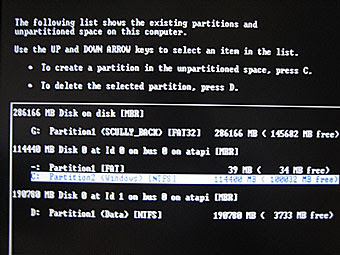
. Press enter on the C drive, It will ask you if want to do a quick format or normal format, Press enter on quick format...
. Let it format, After the format has completed, It will copy windows files, When that has completed it will say "computer will reboot in 15 seconds"...
. Now your computer has rebooted it will carry on with the set up from there you will know what you are doing Razz
Note: If you lose any data while doing this, I am NOT responsible.
A windows Xp disc (bootable)...
A windows Xp Operating system...
Lets get started Razz
. Restart your PC and do the following...
. Go into the BIOS settings of your PC, usually by pressing the F1, F2, F10, or maybe the delete key, If you are not sure watch the screen at startup and it will say "To enter setup press..." You have to be quick and press it. If you miss it restart again, Once you are in the bios you have to change the boot options, You have to make your cd rom the first boot option. Save and exit (F10 to save and exit)...
. First you put your Windows XP CD in the drive...
. When it says press any key to boot from cd, Press any key on the keyboard...
. If it doesn't ask you this then restart your computer again...
. A blue screen will appear and you are on your way...
. Once the set up has loaded all the windows files, It will say "press F8 to agree to the terms and conditions" press F8...
. Now you are at the set up, Click your C drive and format your old windows, Press D, it will ask if you are sure by clicking L...
. You should be back at the partions, It will look like this...

. Press enter on the C drive, It will ask you if want to do a quick format or normal format, Press enter on quick format...
. Let it format, After the format has completed, It will copy windows files, When that has completed it will say "computer will reboot in 15 seconds"...
. Now your computer has rebooted it will carry on with the set up from there you will know what you are doing Razz
Note: If you lose any data while doing this, I am NOT responsible.
|
| |
Subscribe to:
Posts (Atom)

