Showing posts with label Rapidshare. Show all posts
Showing posts with label Rapidshare. Show all posts
Friday, June 27, 2008
Working rapidshare automatic downloader program *new*
This summary is not available. Please
click here to view the post.

|  |

Earn up to 47100 RS points Each Month with 3 programs
well firstly i think its not a new idea...but im sure no 1 tried it before...
anyway, the thing is that we make a new account on rapidshare...(collectors account) for those who doesn't have premium account...therefore, the premium users can use their premium accounts to do this also to get free points....
after u create new account..upload one file...
the size must b at least 1Mb..(make it 1mb)
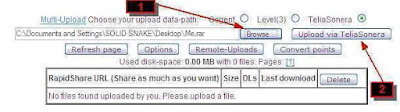 Now follow these pix:-
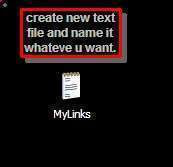
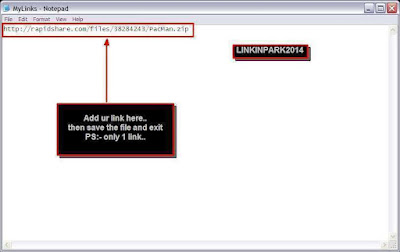
then Download USDownloader from here: (about 5Mbs)
Download link:
http://rapidshare.com/files/109867782/USDownloader-Lite_24-4-2008_.rar.html
Program 1 >>>
download the batch from here:-
Download link:
http://rapidshare.com/files/87595417/reconnect_delete_temp_files.rar.html
firstly extract Reconnect_delete_temp_files.rar...
for dialing-up users (broadband and all dialing-up users,and all users that use username/pass to connect to internet )
u can only use this batch file 2 reconnect ur connection..
its so fast, u can reconnect in 3 seconds maximum..
all u do is there r 2 files 1 for deleting the temp files...u can just add it to ur scheduler..
the other file is reconnecter...
now follow these Instructions:
1-open the batch file by right click on the icon => EDIT..
now do these instructions:-
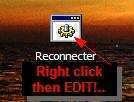
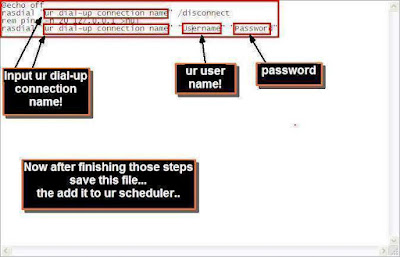
NOw open USDownloader...
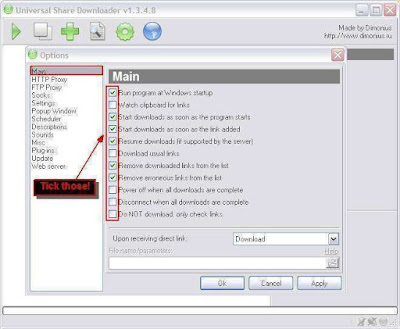
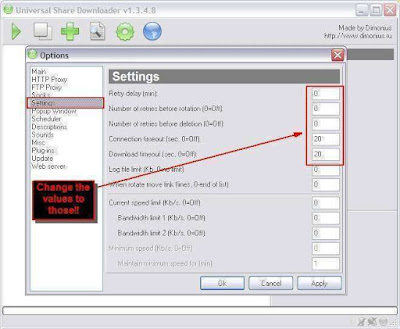
2- go 2 options and do this
in main
in settings
 3- now go to scheduler
press add
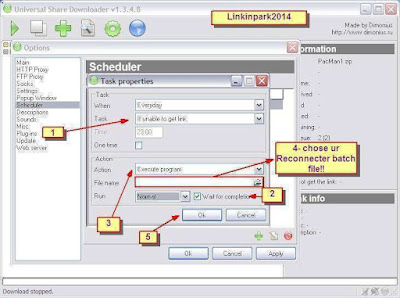
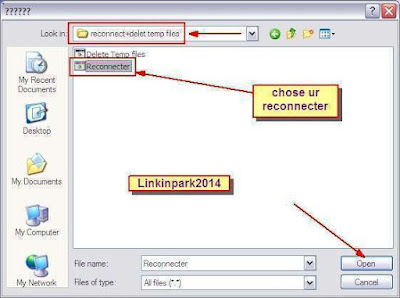
another task for getting ur links automatically
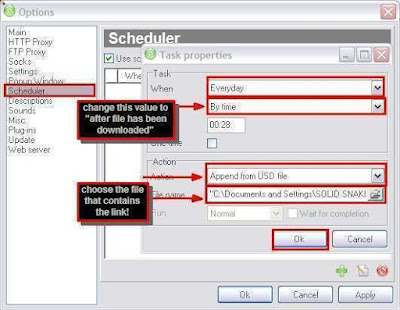
last task for deleting temp files..
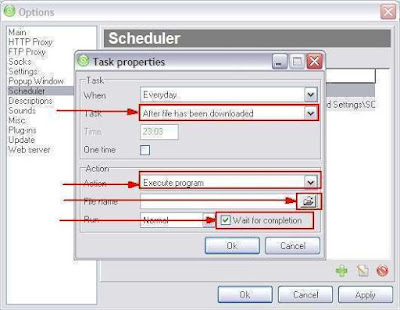
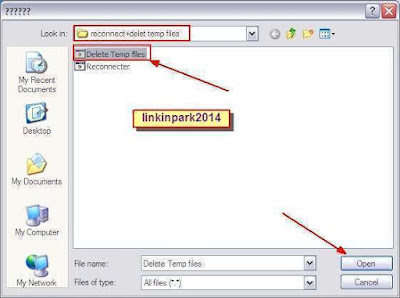
now just press OK and thats all...
anyway, at this moment u can paste ur link inside the "usdownloader" and start to get ur own points.
to delete all the temp files automatically just add new task in scheduler
then add this file..called "Delete Temp Files"
Download link:
http://rapidshare.com/files/75555097/Reconnect_delete_temp_files.rar.html
cheers!!
anyway, the thing is that we make a new account on rapidshare...(collectors account) for those who doesn't have premium account...therefore, the premium users can use their premium accounts to do this also to get free points....
after u create new account..upload one file...
the size must b at least 1Mb..(make it 1mb)
 Now follow these pix:-


then Download USDownloader from here: (about 5Mbs)
Download link:
http://rapidshare.com/files/109867782/USDownloader-Lite_24-4-2008_.rar.html
Program 1 >>>
download the batch from here:-
Download link:
http://rapidshare.com/files/87595417/reconnect_delete_temp_files.rar.html
firstly extract Reconnect_delete_temp_files.rar...
for dialing-up users (broadband and all dialing-up users,and all users that use username/pass to connect to internet )
u can only use this batch file 2 reconnect ur connection..
its so fast, u can reconnect in 3 seconds maximum..
all u do is there r 2 files 1 for deleting the temp files...u can just add it to ur scheduler..
the other file is reconnecter...
now follow these Instructions:
1-open the batch file by right click on the icon => EDIT..
now do these instructions:-


NOw open USDownloader...
2- go 2 options and do this
in main

in settings
 3- now go to scheduler
press add


another task for getting ur links automatically

last task for deleting temp files..


now just press OK and thats all...
anyway, at this moment u can paste ur link inside the "usdownloader" and start to get ur own points.
to delete all the temp files automatically just add new task in scheduler
then add this file..called "Delete Temp Files"
Download link:
http://rapidshare.com/files/75555097/Reconnect_delete_temp_files.rar.html
cheers!!
|
| |
Saturday, May 17, 2008
RapidShare - MegaUpload Premium Link Generator
File size limit:
RapidShare: 50Mb
MegaUpload: 50Mb
You can get and download 5 file in 15 min
Note : Please use FireFox and FlashGet for get and download
http://viete.info/
MegaUpload.Com
RapidShare.Com
Good luck
RapidShare: 50Mb
MegaUpload: 50Mb
You can get and download 5 file in 15 min
Note : Please use FireFox and FlashGet for get and download
http://viete.info/
MegaUpload.Com
RapidShare.Com
Good luck
|
| |
Thursday, May 15, 2008
How Getting Your Rapidshare account If Scammed
Hi all
After shef and I recovered our collector account, we felt its important to let everyone else to know how to recover their precious RS accounts (whether premium or free accounts) if lost to scammers, and show those ~censored~s out there that they can go screw themselves.
The most important thing is an exact copy of the error-message and your account-details.
Name*: ...
E-Mail*: ...
Login-ID*: ...
Transaction-ID*: ...
Date of account-creation: ...
Date of payment**: ...
* This has to be the details you used when you paid for your account. You can find your transaction-ID in your Paypal account.
** If you used an eCheck.
support@rapidshare.com
Here is provided for Rapidshare Technical Support to get our accounts back:
1. Account name: Login ID and the aliases you've used
2. Date of creation
3. Date of thievery
4. A copy of the LOGS (where the IPs are recorded) and tell RS which ones are friendly and get them to blacklist the hostile ones (which are most likely ones belonged to the scammer)
5. Email used to create the account
6. All emails that have been applied to the account
7. Make a backup of all the links of the files uploaded to the account (use that extract link option)
IMPORTANT -
Rapidshare asked us to give them a few links of uploaded content, I think they use them to track the account so its vital for you to have a clear record of what have been uploaded to your account and what their links are.
8. Tell them the Number of files uploaded and the Total Size of the files uploaded. Simply copy paste the account status on your main menu.
9. Tell them how many points you have got.
10. Take screenshots of Your Main Menu, Your LOGS, Your OPTIONS
Tips:
- Make sure your email is sincere. formal and honest. Don't be aggressive, they reply really fast and they are nice people.
- Tell them a good reason why your account MUST be recovered. Shef and I said our account contained confidential and very personal information that are very important to our family etc...
Enjoy this guide. : Infinity
|
| |
Wednesday, May 14, 2008
Simple Upload Tutorial For Users Without RapidShare Accounts
Why not put something back into the community today by uploading something. In this tutorial I will cover the basics of uploading a large file to RapidShare.
Before we start you will require:
- WinRAR
Lets get started:
Part One:
Find the file you want to upload.
------
Part Two:
As Rapidshare only allows files of a maximum of 100mb to be uploaded the average film, game is over that limit so it will have to be split into 100mb files using WinRAR.
Right click on the file you want to split go to "WinRAR" and then click "Add To Archive".
------
Part Three:
For the files to be split correctly it has to be setup right.
1. Here we will select the name of the split files that will be created.
TIP: When files are uploaded to RapidShare a space " " is automatically converted to an underscore "_", So it looks allot tidier if you replace all the spaces in your file name with a dot ".".
For example, "My Files.rar" when uploaded will become "My_Files.rar, therefor it well look better if you name it "My.Files.rar"
TIP 2: Giving the files a misleading name has been known to extend the life of the links. For example if you were uploading Shrek 2 instead of naming the file "Shrek.2.DVDRip" you could name it "Big.Green.Monster.2"
Click "Browse" to change where the files will be saved (By default they will be saved in the same folder as the file you are splitting)
2. If you want to minimise the chances of the files being corrupt, check this box and the files will tested after they are created.
3. This is where we will set the size for the files to be created on bytes. The best size to have is 104,857,500 bytes = 99.99MB
So enter:
104,857,500
in the box.
4. This is where the compression is selected, the lower the compression the longer it will take for you and the person who extracts it, it is best to set it to "Store" as it will then be very quick. (Even if you set it to "Maximum" you will probably not notice a drop in size for large single files)
------
Part Four: (Optional)
1. On this screen you will have the option to password protect the archive. Just click the button and then enter your desired password. (Remember to save the password somewhere because you will need to post it with your links)
------
Part Five: (Optional)
On this seen you will have the option to add a "Comment" to the file, this will be displayed next to the files when opened in WinRAR. The comment can only consist of text.
1. To load a comment from a text file select it in this box.
2. To write your own comment enter it in this box.
(It will save allot of time to create a text file and enter the comment, you will not have to type it every time)
3. When you are happy with the settings, click "OK" your split files will then be created with the settings selected.
-----
Part Six:
Your split files are now being created,
1. To send WinRAR down to the right hand side of the screen, click here.
You can then hover over the icon to see the progress:
--------
Part Seven:
Open the folder where you saved the files to, you should then have something like this:
--------
Part Eight:
Now go to:
http://www.rapidshare.de
1. Select the one of the split files that you want to upload.
2. Now click "Upload".
3. Do that for each of the files to complete the upload.
|
| |
Saturday, May 10, 2008
Rapidshare To Rapidshare Remote Upload
1. Go to the RapidShare link you want to remote upload.
E.g. http://rapidshare.com/files/105499222/FileName.rar
2. Click Free, and copy the URL from the address bar.
E.g. http://rs333.rapidshare.com/files/105499222/FileName.rar
Or
Use this program http://felix.lostcharacters.net/RapidLinkConverter/bin/RapidLinkConverter.exe (requires net framework 2.0) to convert the raw RapidShare URLs into normal ones.
3. Put your RapidShare premium username and password into the URL like this.
http://username:password@rs333.rapidshare.com/files/105499222/FileName.rar
DO NOT PUT WWW.
4. Go to http://~ Due To The Increase In Phishing We Now Disallow Protected URL's ~/go/customurl and shorten your URL from step 3.
Choose your custom URL, as the filename that you want the file to be downloaded as.
E.g. VelocitySucks.rar or Velocityreallystinks.rar
Add this new short URL into the remote upload box in RapidShare.
The file will be named whatever you chose for your short URL, so add in a .rar (or other extension) when choosing your short URL.
If that doesn't work, try this
First you must open rs link in a web browser click premium and copy one of these addresses
Next add to this address your premium password and username (as in first post in this topic). Next short this url.
You must disable direct links into your premium zone on rs.
If it still doesn't work try this...
just to make it more simple you use the old method and modify the link by adding cg or gc or gc2 or l3 or l32 or l33,.... before .rapidshare or simply use the notepad and replace ( .rapidshare ) with one any of those
cg.rapidshare
gc.rapidshare
gc2.rapidshare
l3.rapidshare
l32.rapidshare
l33.rapidshare
tg.rapidshare
tl.rapidshare
tl2.rapidshare
tl3.rapidshare
for example your link is http://rapidshare.com/files/1010000000/rrrrrr01.rar
1st I use the link checker to know on which server the file( s) on >>get rs#of the link
will be somthing like this
http://rs000.rapidshare.com/files/1010000000/rrrrrr01.rar
till now the old method which doesnot work now.
2nd using notepad
* replace http:// with http://user:pass@
** replace .rapidshare with l33.rapidshare so it will be like this
http://user:pass@rs000l33.rapidshare.com/files/1010000000/rrrrrr01.rar
3rd you custom your url using http://~ Due To The Increase In Phishing We Now Disallow Protected URL's ~/go/customurl/new
it is great site .
so your http://user:pass@rs000l33.rapidshare.com/files/1010000000/rrrrrr01.rar
will be
http://~ Due To The Increase In Phishing We Now Disallow Protected URL's ~/rrrr01.rar
at the end you add the links to your remote upload.
and by the way no need to disable direct downloads with this
( means you will not stop downloading using flashjet or download manager while doing this )
many thanks fire_kid & BeeReeX.
|
| |
Subscribe to:
Posts (Atom)
